FAQ

Support

FAQ

Hier finden Sie weitere Informationen über unsere Produkte, die ISQ-Skala und deren Verwendung, OsstellConnect, die Osstell-Technologie und vieles andere mehr.
Questions about Smartpegs

Questions about Smartpegs

Can the reusable SmartPeg be sterilised according to the Prion cycle?

Yes, it can be sterilised with a Prion cycle at 134 °C for 18 minutes.

How should I mount the SmartPeg on the implant?

Whether you are using a single-use or a reusable SmartPeg, it should always be installed using the SmartPeg Mount and tightened to approximately 4–6 Ncm – typically described as finger tight. This ensures proper seating and accurate ISQ measurements without risking damage to the implant or the SmartPeg.

Can I mix single-use and reusable SmartPegs in the same treatment session?

Yes. You can mix single-use and reusable SmartPegs during the same treatment session. The only requirement is that you use the correct SmartPeg Type number for the specific implant or abutment you are measuring.

Whether the SmartPeg is single-use or reusable does not affect the measurement.

Does a reusable SmartPeg provide the same ISQ values as a single use SmartPeg?

Yes, as long as its integrity and performance are maintained.

Osstell is also the only company offering both a sterile single-use and a reusable SmartPeg made of aluminium, supported by more than 1,500 published studies on the ISQ method.

With the Osstell original ISQ scale and SmartPegs, no conversion tables or correction factors are needed. The measured ISQ value is the true value, regardless of whether you use a single use or a reusable SmartPeg.

How are the different SmartPegs packed?

SmartPegs are supplied in different packaging formats depending on whether they are single-use or reusable:

Single-use SmartPegs

  • Delivered sterile.
  • Supplied in boxes of 5 pieces, in a single sterile barrier system with protective outer packaging.
  • Intended for one treatment session only and must not be reused.

Reusable SmartPegs

  • Delivered nonsterile in individual packaging.
  • Must be cleaned, disinfected and sterilized before the first clinical use and after every subsequent use. (See quickguide at osstell/ifu).

SmartPeg Mount

  • Delivered nonsterile with the instrument.
  • Can be purchased separately, in package of 5.
  • Must also be cleaned, disinfected and sterilized before use and between patients. (See quickguide at osstell/ifu).
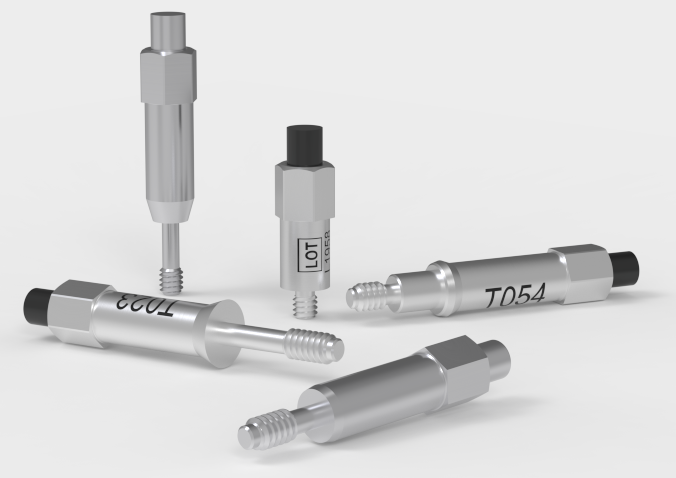
Is there a visual difference between the single-use and reusable SmartPeg?

Yes. The reusable and single use SmartPegs are designed so they can be easily distinguished visually:

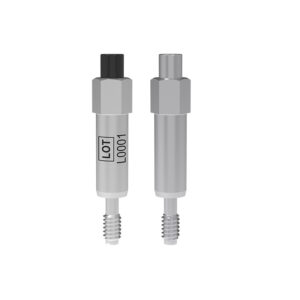
  • The single-use SmartPeg is supplied sterile, has an aluminium coloured (non coloured) magnet, and does not include any laser marked identifiers on the body.
  • The reusable SmartPeg has a black magnet on top and carries laser marked Type and LOT numbers on the body for identification and traceability.
How many times can the SmartPeg be used?

The reusable SmartPeg can be used for up to 20 reprocessing cycles, as long as its integrity and performance are maintained.

If inspection reveals wear, deformation, corrosion, damaged threads, or any loss of functional compatibility, the SmartPeg must be discarded, even if it has been processed fewer than 20 times.

The single-use SmartPeg is intended for one treatment session only and must not be reprocessed.

Why can the reusable SmartPeg be cleaned and sterilised when the single-use SmartPeg cannot, even though both are made of aluminium?

The reusable SmartPeg is engineered with special protective surface coating – one on the SmartPeg body and another black protective coating on the magnet. These coatings provide resistance to moisture, cleaning chemicals, wear, and corrosion, ensuring that the SmartPeg maintains its performance throughout the validated number of reprocessing cycles.

The reusable SmartPeg can easily be distinguished from the single use version: it has a black magnet, and its LOT and Type number are laser marked on the body for clear identification.

How should the reusable SmartPeg and the SmartPeg Mount be cleaned and sterilized?

Prior to the first clinical use, and after each use the reusable products must be cleaned, disinfected and sterilized according to the instructions in the quickguide that is found here: Osstell/ifu

How do I measure and record ISQ on an abutment?

You can record ISQ at abutment level in OsstellConnect, but it is important to follow the correct clinical measurement procedure to obtain accurate values.

How to measure ISQ at abutment level

  1. Perform an implant level measurement first, before placing the abutment.
  2. Measure again at abutment level during the same session, using a SmartPeg made for abutment level measuring.
  3. Determine the offset by noting the difference between implant level and abutment level ISQ. This offset remains stable throughout healing and should be used when interpreting follow-up measurements.
  4. For all subsequent visits, measure on the abutment and apply the same offset to understand the true implant ISQ.

How to record the measurement in OsstellConnect:

  1. Go to the patient’s register, select the patient and the implant in the tooth chart. Click ‘Add abutment’, choose the abutment, and save.
  2. Select ‘Measure stability’ and choose ‘Abutment’ under Measurement level. Measure on the abutment as you would at implant level and save.
  3. To review the stability trend, open the Stability tab and toggle ‘Show abutment’. You can also enable ‘Show details’ to view buccal–lingual and mesial–distal ISQ values.

For a more detailed explanation and clinical guidance, see our blog post here.

Why do I need to take two measurements at the same occasion?

ISQ should always be measured in two directions, because implant stability can vary depending on the amount of surrounding bone in different directions. Measuring from two angles ensures that both the most and the least stable directions are captured.
To do this, take one measurement in the buccal-lingual direction and one in the mesial-distal direction. These two ISQ values represent the different stability directions. Sometimes the values are identical; sometimes they differ.
If the two measurements differ, always rely on the lowest ISQ value, as it reflects the weakest direction and therefore provides the most clinically relevant information about implant stability.

Are there any studies that prove the Osstell method?

There are currently thousands of articles where Osstell was used in the study, published in scientific papers. These abstracts could be found in our searchable database under “Resources/Scientific database“.

The Osstell ISQ scale is based on outcomes from these studies, all performed using Osstell instruments and aluminium SmartPegs.

Do I need a torque device to tighten the SmartPeg correctly?

No. A torque device should not be used to tighten the SmartPeg.

SmartPegs should always be mounted using the SmartPeg Mount and tightened to approximately 4–6 Ncm, which is typically described as finger tight.

This ensures the SmartPeg is seated correctly without risking damage to the implant connection.

How does the Osstell technology work?

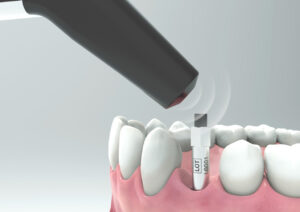
Osstell measures implant stability using Resonance Frequency Analysis (RFA). The small SmartPeg that you attach to the implant has a tiny magnet on top. When the probe sends magnetic pulses, the SmartPeg starts to vibrate – similar to a very small tuning fork.
How it works:

  1. The instrument tip sends magnetic pulses
    These pulses make the SmartPeg vibrate without touching it.
  2. The vibration changes depending on how stable the implant is
    – A stable implant (good bone support) makes the SmartPeg vibrate faster.
    – A less stable implant makes it vibrate slower.
  3. The device converts this vibration into an ISQ value
    – Higher stability → higher frequency → higher ISQ
    – Lower stability → lower frequency → lower ISQ

It takes less than a second, and the ISQ value is shown immediately.

Does the way the SmartPeg is tightened affect the ISQ value?

Yes. The ISQ value can be affected if the SmartPeg is not mounted correctly.

For accurate measurements, the SmartPeg should be attached finger tight using the SmartPeg Mount, which corresponds to about 4–6 Ncm.

At this level, the SmartPeg has firm, stable contact with the implant, and the resulting ISQ value is consistent – typically within ±2 ISQ units.

  • If the SmartPeg is not fully seated:
    The contact becomes unstable, and the ISQ value can appear artificially low, or you don’t receive any value.
  • If too much force is applied:
    Overtightening does not improve accuracy. It may damage the SmartPeg threads.
    – A reusable SmartPeg may be damaged so it cannot be used again.
    – A single use or reusable SmartPeg may have its threads deformed, which can lead to inaccurate measurements during that session or, in worst case a broken SmartPeg.

In short: finger tight (4–5 Ncm) is enough to ensure stable contact and reliable ISQ readings.

What should I do if no ISQ value is displayed?

If no ISQ value appears, it usually means the SmartPeg’s vibration is not being detected clearly by the instrument. Several factors can cause this, and most are easy to resolve:

  1. Distance to instrument is too great
    The instrument should normally be held 2–4 mm from the magnet on top of the SmartPeg. Do not touch the magnet. If no value appears, move the instrument closer until the signal is detected.
  2. Angle needs adjustment
    The magnetic field is directional, so the orientation of the instrument matters. Measurements should be taken at approximately a 45° angle relative to the top of the SmartPeg.
  3. Ensure you have the correct SmartPeg Type for the specific implant
    Use this link to find the correct SmartPeg Type: Find my SmartPeg
  4. Soft tissue damping
    Surrounding tissue can sometimes dampen the vibration more than expected. Holding the instrument a bit closer usually compensates for this.
  5. The implant platform is not clean
    Ensure the implant platform is clean and free of debris, so the SmartPeg seats properly and transmits its vibration.
  6. The SmartPeg is worn or damaged
    • If you are using a reusable SmartPeg, make sure it has been inspected before use and that it is within 20 reprocessing cycles. A reusable SmartPeg that is worn out, bent, or has damaged threads will not vibrate correctly — and the instrument may not be able to pick up a reading.
    • A single‑use SmartPeg is intended for one treatment session only.
    • Ensure the SmartPeg is properly seated on the implant and that it is not in contact with surrounding tissue, as this can prevent accurate signal detection and may result in no ISQ value or an incorrect one.
  7. Electromagnetic interference
    Strong electromagnetic noise sources nearby may disturb the measurement. (See the FAQ on “Electromagnetic noise” for details.)
Which Osstell products can be autoclaved?

The following products may be autoclaved (over-pressurized steam up to 135 deg Celsius):

  • SmartPeg Mount
  • Reusable SmartPeg
  • Probe (IDx)

Please note that single-use SmartPegs are disposable and cannot be autoclaved!

How do I select the correct SmartPeg for my implant?

Different implants require specific SmartPegs to ensure accurate measurement. Each SmartPeg is matched to a particular implant system and connection type.

You can find the correct SmartPeg for your implant in the SmartPeg Reference Guide – click here to access it.

Questions about the Osstell Beacon

Questions about the Osstell Beacon

Wie lange hat man Garantie auf den Osstell Classic?

1 Jahr.

Wie reinige ich den Osstell Classic?

Befeuchten Sie vor jedem Gebrauch Mull oder ein weiches Tuch mit einem der empfohlenen Oberflächenreiniger (siehe folgende Liste) und wischen Sie das gesamte Instrument damit ab.


Empfohlene Reinigungsmittel:

  • Isopropylalkohol, 70 %
  • Schwach schäumende, pH-neutrale, enzymatische Reinigungsmittel wie:

BePro Disinfectant Wipes, REF 19500102, www.wh.com (können bei W&H Sterilization bestellt werden)
Medizime LF
Enzol


Folgende Reinigungsmittel dürfen nicht verwendet werden:

  • Reinigungs- oder Desinfektionsmittel auf Phenol-/Säurebasis
  • Stark alkalische Reinigungsmittel aller Art einschließlich Handseifen und Geschirrspülmittel
  • Reinigungsmittel auf Bleichmittelbasis
  • Reinigungsmittel auf Wasserstoffperoxidbasis
  • Scheuermittel
  • Reinigungsmittel auf Aceton- oder Kohlenwasserstoffbasis
  • MEK (Methylethylketon)
  • Birex
  • Glutaraldehyd
  • Reinigungsmittel auf der Basis von quartärem Ammoniumchloridsalz

Das Instrument erfordert keine regelmäßige Wartung. Bei einer Fehlfunktion des Instruments kontaktieren Sie für weitere Informationen den Vertrieb oder den Händler vor Ort.

How do I measure and record ISQ on an abutment?

You can record ISQ at abutment level in OsstellConnect, but it is important to follow the correct clinical measurement procedure to obtain accurate values.

How to measure ISQ at abutment level

  1. Perform an implant level measurement first, before placing the abutment.
  2. Measure again at abutment level during the same session, using a SmartPeg made for abutment level measuring.
  3. Determine the offset by noting the difference between implant level and abutment level ISQ. This offset remains stable throughout healing and should be used when interpreting follow-up measurements.
  4. For all subsequent visits, measure on the abutment and apply the same offset to understand the true implant ISQ.

How to record the measurement in OsstellConnect:

  1. Go to the patient’s register, select the patient and the implant in the tooth chart. Click ‘Add abutment’, choose the abutment, and save.
  2. Select ‘Measure stability’ and choose ‘Abutment’ under Measurement level. Measure on the abutment as you would at implant level and save.
  3. To review the stability trend, open the Stability tab and toggle ‘Show abutment’. You can also enable ‘Show details’ to view buccal–lingual and mesial–distal ISQ values.

For a more detailed explanation and clinical guidance, see our blog post here.

How can I find the serial number (SN)?

You can find the serial number on the back of your instrument.

How can I find my registration code?

Osstell Beacon
• To find your registration code, please make sure that you have already installed the Beacon Gateway. If you have not installed it yet, please navigate to your clinic in your account, click the instruments tab and download the gateway. Install it.
• Take your instrument in hand. It is now connecting to OsstellConnect and you should see a symbol animating. Please note that it can take a few seconds.
• When connected, the symbol stops animating.
• The registration code is now displayed on the lower screen of your instrument.

Osstell IDx
• When turning on your Osstell IDx for the first time, you will be prompted to select language, time zone, date and time.
• After that, you will need to set up a 4-digit pin code and a backup password. The backup password is needed when restoring to a backup, so please note it down and save it in a safe place.
• Your registration code is now displayed on your Osstell IDx.

How do I get started?

Start by charging the instrument for about 3 hours to ensure optimal performance.

The Osstell Beacon starts automatically when moved, shows the battery status, and is then ready for measurement in the BL (buccal-lingual) direction.

Bring the instrument close to a SmartPeg or TestPeg to start measuring. An audible signal confirms the measurement, and the ISQ value is shown together with a coloured stability indication (red, yellow, green).

At start-up, an OsstellConnect code is displayed until the instrument is registered. You can register your instrument here: Register to OsstellConnect.

The instrument turns off automatically after 60 seconds without movement.

How do I measure with the Osstell Beacon?

Video on how to measure: Measure with Osstell Beacon

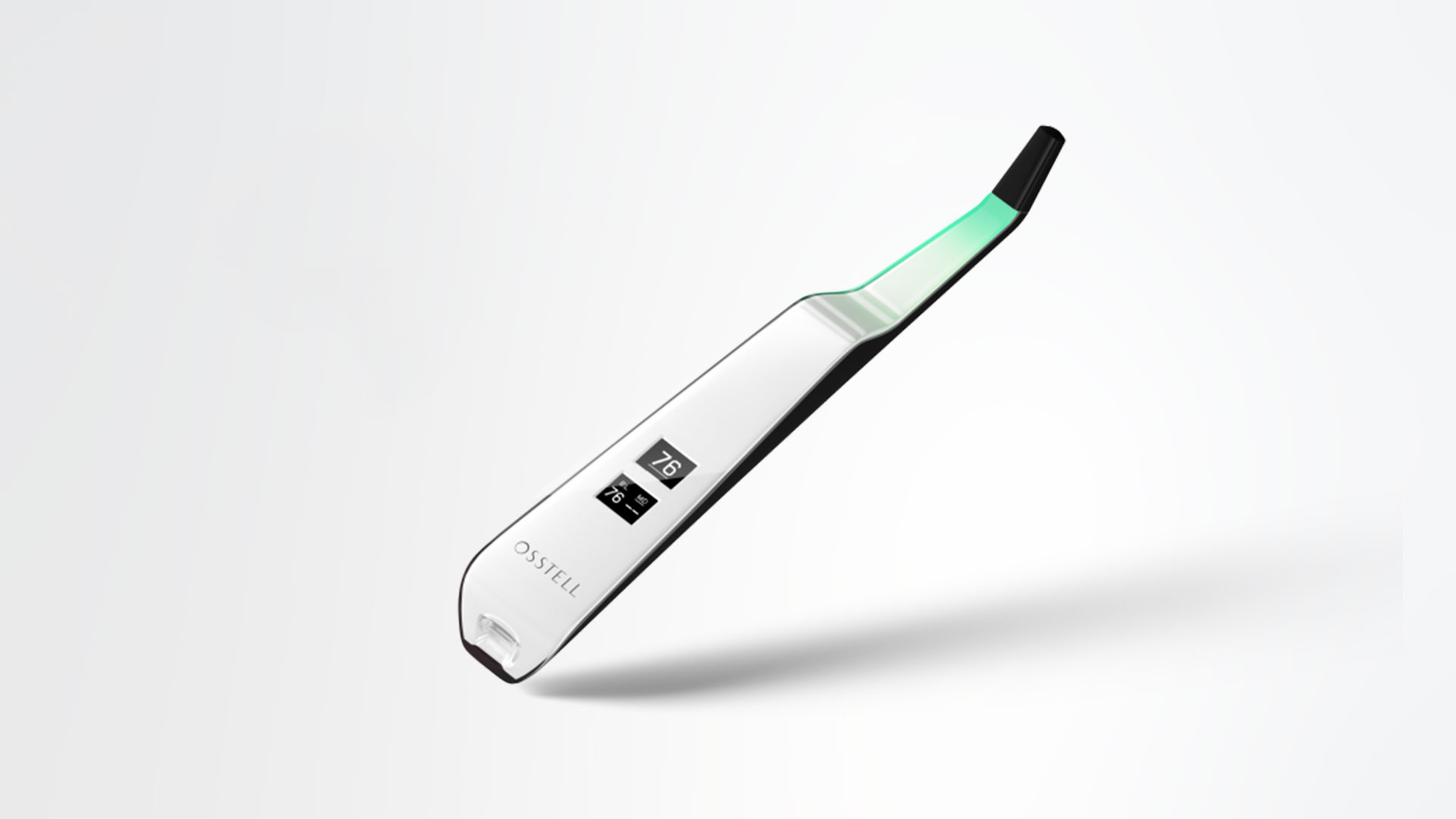
1. Activate the Osstell Beacon by picking it up. The instrument will start-up and after showing the battery status, the instrument will be ready for measurement in the BL (Buccal – Lingual) direction, which is prompted in the upper display as well as optimal angle towards the Smartpeg.

2. Place a barrier sleeve over the Osstell beacon instrument.

3. Place the SmartPeg into the SmartPeg Mount. The SmartPeg is magnetic, and the SmartPeg Mount will hold the SmartPeg. See fig 2. Attach the SmartPeg to the implant or abutment by screwing the SmartPeg Mount using finger force of approximately 4-6 Ncm. Do not over-tighten, to avoid damaging the SmartPeg threads.

4. Hold the instrument tip close (2-4mm) to the top of the SmartPeg without touching it. Sometimes, you will need to go as close as 1 mm. An audible sound indicates when measurement has started, and measured data will be shown in the upper display combined with a colored light indication below the tip.

5. Bring the instrument out of the mouth to clearly read the ISQ value and the colored indication. The measured ISQ values will be displayed in the upper display for a couple of seconds and then switch to be ready for measurement in mesial-distal direction.

6. Repeat step 4 and the sequence starts over and the Osstell Beacon is ready for measurement in the BL (Buccal- Lingual) direction again.

7. When all measurements are performed, remove the SmartPeg by using the SmartPeg Mount. The instrument is automatically turned off after 60 seconds of inactivity.

Woran kann es liegen, wenn ich beim Messen unerwartete Werte oder kein Ergebnis erhalte?

Mögliche Gründe:


Wiederverwendeter SmartPeg: SmartPegs sind Einwegprodukte und dürfen nur für eine oder mehrere Messungen im Rahmen einer einzigen Behandlungssitzung und nur für einen einzigen Patienten verwendet werden. Wiederholter Gebrauch kann aufgrund von Verschleiß am weichen SmartPeg-Aluminiumgewinde zu falschen Messwerten führen.


Wahl des falschen SmartPeg-Typs für das Implantat: Siehe SmartPeg-Referenzliste unter osstell.com/smartpegguide


Knochen oder Weichgewebe zwischen SmartPeg und Implantat: Achten Sie darauf, die Verbindung zwischen Implantat und Prothese vor dem Anbringen des SmartPegs zu reinigen.


Elektromagnetische Störungen: Entfernen Sie die Quelle elektromagnetischer Störungen.


Zu großer Abstand zwischen Sonde und SmartPeg: Halten Sie die Sonde in einem Abstand von 2 bis 4 mm zum SmartPeg.

Do I need to be connected to Wi‑Fi?

No, a Wi‑Fi connection is not required to use your Osstell Beacon. You can measure implant stability and document ISQ values manually in your patient journal or in OsstellConnect at a later stage.
If connected, the Osstell Beacon can communicate wirelessly with OsstellConnect, allowing measurements to be transferred and recorded automatically.
OsstellConnect is an online tool used for data collection, statistical analysis and clinical insights based on your measurements.
To use the data connection, your Osstell Beacon must first be registered. The serial number can be found on the back of the instrument. For registration guidance and more information, please visit https://osstellconnect.com/register

How do I switch the Osstell Beacon from transport mode to use mode?

The Osstell Beacon is delivered in transportation mode with the motion sensor deactivated. To switch modes, briefly connect the USB cable to the instrument and a USB port on a computer for a few seconds, then disconnect.

What should I do if the Osstell Beacon doesn’t start or when the display is showing a wrench and a manual?

Charge the Beacon for at least 30 min in room temperature, then try again. If the error remains, try resetting the device by:

1. Identify the Beacon reset pin on the picture below.

2. With a paper clip, do a gentle press for 1 second on the reset button (Note! You may have to tilt the pin a little downwards).
If you see a “PadLock” symbol in the upper display, press one more time on the reset button.


If the Beacon still doesn’t start or the display is showing a wrench and a manual, then please contact your local sales representative or distributor or support@osstell.com.

Why do I need to take two measurements at the same occasion?

ISQ should always be measured in two directions, because implant stability can vary depending on the amount of surrounding bone in different directions. Measuring from two angles ensures that both the most and the least stable directions are captured.
To do this, take one measurement in the buccal-lingual direction and one in the mesial-distal direction. These two ISQ values represent the different stability directions. Sometimes the values are identical; sometimes they differ.
If the two measurements differ, always rely on the lowest ISQ value, as it reflects the weakest direction and therefore provides the most clinically relevant information about implant stability.

Are there any studies that prove the Osstell method?

There are currently thousands of articles where Osstell was used in the study, published in scientific papers. These abstracts could be found in our searchable database under “Resources/Scientific database“.

The Osstell ISQ scale is based on outcomes from these studies, all performed using Osstell instruments and aluminium SmartPegs.

How does the Osstell technology work?

Osstell measures implant stability using Resonance Frequency Analysis (RFA). The small SmartPeg that you attach to the implant has a tiny magnet on top. When the probe sends magnetic pulses, the SmartPeg starts to vibrate – similar to a very small tuning fork.
How it works:

  1. The instrument tip sends magnetic pulses
    These pulses make the SmartPeg vibrate without touching it.
  2. The vibration changes depending on how stable the implant is
    – A stable implant (good bone support) makes the SmartPeg vibrate faster.
    – A less stable implant makes it vibrate slower.
  3. The device converts this vibration into an ISQ value
    – Higher stability → higher frequency → higher ISQ
    – Lower stability → lower frequency → lower ISQ

It takes less than a second, and the ISQ value is shown immediately.

What should I do if no ISQ value is displayed?

If no ISQ value appears, it usually means the SmartPeg’s vibration is not being detected clearly by the instrument. Several factors can cause this, and most are easy to resolve:

  1. Distance to instrument is too great
    The instrument should normally be held 2–4 mm from the magnet on top of the SmartPeg. Do not touch the magnet. If no value appears, move the instrument closer until the signal is detected.
  2. Angle needs adjustment
    The magnetic field is directional, so the orientation of the instrument matters. Measurements should be taken at approximately a 45° angle relative to the top of the SmartPeg.
  3. Ensure you have the correct SmartPeg Type for the specific implant
    Use this link to find the correct SmartPeg Type: Find my SmartPeg
  4. Soft tissue damping
    Surrounding tissue can sometimes dampen the vibration more than expected. Holding the instrument a bit closer usually compensates for this.
  5. The implant platform is not clean
    Ensure the implant platform is clean and free of debris, so the SmartPeg seats properly and transmits its vibration.
  6. The SmartPeg is worn or damaged
    • If you are using a reusable SmartPeg, make sure it has been inspected before use and that it is within 20 reprocessing cycles. A reusable SmartPeg that is worn out, bent, or has damaged threads will not vibrate correctly — and the instrument may not be able to pick up a reading.
    • A single‑use SmartPeg is intended for one treatment session only.
    • Ensure the SmartPeg is properly seated on the implant and that it is not in contact with surrounding tissue, as this can prevent accurate signal detection and may result in no ISQ value or an incorrect one.
  7. Electromagnetic interference
    Strong electromagnetic noise sources nearby may disturb the measurement. (See the FAQ on “Electromagnetic noise” for details.)
Does using the Osstell instrument affect the implant?

No. The Osstell measurement does not affect the implant. The instrument only makes the SmartPeg vibrate. The SmartPeg’s magnet is activated by very low energy magnetic pulses generated by the instrument. The technique is objective, gentle, and highly repeatable

Can I measure ISQ on a patient with a pacemaker?

Yes, ISQ measurements can be performed on patients with a pacemaker.
As a precaution, the probe should be kept away from the chest area where the pacemaker is located, due to the magnetic pulses emitted during measurement.
There are published reports regarding pacemakers and magnetic fields for further reference.

When should I measure implant stability?

Implant stability can be measured at different stages of treatment.
It is typically measured at implant placement to establish a baseline, and then during healing to monitor changes in stability and osseointegration. A final measurement is often taken before loading to support the decision.
Repeated measurements over time provide valuable information, as the trend in ISQ values helps guide clinical decisions.

Osstell Classic

Fragen zum Osstell Classic

Wie lange hat man Garantie auf den Osstell Classic?

1 Jahr.

Wie misst man mit dem Osstell Classic?

Legen Sie vor der Anwendung am Patienten eine Hygieneschutzhülle über das Instrument. Die Hygieneschutzhülle trägt zur Prävention von Kreuzkontaminationen bei, wirkt dem Anhaften des zahnmedizinischen Kompositmaterials an der Spitze oder am Korpus des Instruments entgegen und schützt vor Verfärbung und Degeneration durch Reinigungslösungen.


Hinweis

  • Hygieneschutzhüllen sind für den Einmalgebrauch vorgesehen.
  • Entsorgen Sie gebrauchte Hygieneschutzhüllen nach dem Einsatz am Patienten im Restmüll.
  • Lassen Sie die Hygieneschutzhülle nicht für längere Zeit am Instrument.
  • Empfohlene Hygieneschutzhüllen finden Sie im Folgenden.
  • TIDIShield, Art.-Nr.: 20808, Art.-Nr.: 20987. tidiproducts.com
  • PremiumPlus: 183-2 Röntgensensorhülle, Größe 2

Das Instrument ist nach jeder Patientenanwendung mit geeigneten Reinigungs- und/oder Desinfektionsmitteln zu reinigen und zu desinfizieren.
Eine erste Messung sollte beim Einsetzen des Implantats vorgenommen werden, um einen Vergleichswert für Folgemessungen während der Einheilung zu erhalten. Vor der finalen Restauration folgt eine weitere Messung, um zu überprüfen, wie sich die Implantatstabilität entwickelt.

Zur Ermittlung der geringsten Stabilität empfiehlt es sich, sowohl in bukkal-lingualer als auch in mesial-distaler Richtung zu messen.

Das Instrument fordert den Benutzer daher auf, Messungen in beide Richtungen vorzunehmen.

Klicken Sie hier für einen Film zum Vorgehen bei einer Messung.

Wie reinige ich den Osstell Classic?

Befeuchten Sie vor jedem Gebrauch Mull oder ein weiches Tuch mit einem der empfohlenen Oberflächenreiniger (siehe folgende Liste) und wischen Sie das gesamte Instrument damit ab.


Empfohlene Reinigungsmittel:

  • Isopropylalkohol, 70 %
  • Schwach schäumende, pH-neutrale, enzymatische Reinigungsmittel wie:

BePro Disinfectant Wipes, REF 19500102, www.wh.com (können bei W&H Sterilization bestellt werden)
Medizime LF
Enzol


Folgende Reinigungsmittel dürfen nicht verwendet werden:

  • Reinigungs- oder Desinfektionsmittel auf Phenol-/Säurebasis
  • Stark alkalische Reinigungsmittel aller Art einschließlich Handseifen und Geschirrspülmittel
  • Reinigungsmittel auf Bleichmittelbasis
  • Reinigungsmittel auf Wasserstoffperoxidbasis
  • Scheuermittel
  • Reinigungsmittel auf Aceton- oder Kohlenwasserstoffbasis
  • MEK (Methylethylketon)
  • Birex
  • Glutaraldehyd
  • Reinigungsmittel auf der Basis von quartärem Ammoniumchloridsalz

Das Instrument erfordert keine regelmäßige Wartung. Bei einer Fehlfunktion des Instruments kontaktieren Sie für weitere Informationen den Vertrieb oder den Händler vor Ort.

How do I measure and record ISQ on an abutment?

You can record ISQ at abutment level in OsstellConnect, but it is important to follow the correct clinical measurement procedure to obtain accurate values.

How to measure ISQ at abutment level

  1. Perform an implant level measurement first, before placing the abutment.
  2. Measure again at abutment level during the same session, using a SmartPeg made for abutment level measuring.
  3. Determine the offset by noting the difference between implant level and abutment level ISQ. This offset remains stable throughout healing and should be used when interpreting follow-up measurements.
  4. For all subsequent visits, measure on the abutment and apply the same offset to understand the true implant ISQ.

How to record the measurement in OsstellConnect:

  1. Go to the patient’s register, select the patient and the implant in the tooth chart. Click ‘Add abutment’, choose the abutment, and save.
  2. Select ‘Measure stability’ and choose ‘Abutment’ under Measurement level. Measure on the abutment as you would at implant level and save.
  3. To review the stability trend, open the Stability tab and toggle ‘Show abutment’. You can also enable ‘Show details’ to view buccal–lingual and mesial–distal ISQ values.

For a more detailed explanation and clinical guidance, see our blog post here.

How can I find the serial number (SN)?

You can find the serial number on the back of your instrument.

Woran kann es liegen, wenn ich beim Messen unerwartete Werte oder kein Ergebnis erhalte?

Mögliche Gründe:


Wiederverwendeter SmartPeg: SmartPegs sind Einwegprodukte und dürfen nur für eine oder mehrere Messungen im Rahmen einer einzigen Behandlungssitzung und nur für einen einzigen Patienten verwendet werden. Wiederholter Gebrauch kann aufgrund von Verschleiß am weichen SmartPeg-Aluminiumgewinde zu falschen Messwerten führen.


Wahl des falschen SmartPeg-Typs für das Implantat: Siehe SmartPeg-Referenzliste unter osstell.com/smartpegguide


Knochen oder Weichgewebe zwischen SmartPeg und Implantat: Achten Sie darauf, die Verbindung zwischen Implantat und Prothese vor dem Anbringen des SmartPegs zu reinigen.


Elektromagnetische Störungen: Entfernen Sie die Quelle elektromagnetischer Störungen.


Zu großer Abstand zwischen Sonde und SmartPeg: Halten Sie die Sonde in einem Abstand von 2 bis 4 mm zum SmartPeg.

Why do I need to take two measurements at the same occasion?

ISQ should always be measured in two directions, because implant stability can vary depending on the amount of surrounding bone in different directions. Measuring from two angles ensures that both the most and the least stable directions are captured.
To do this, take one measurement in the buccal-lingual direction and one in the mesial-distal direction. These two ISQ values represent the different stability directions. Sometimes the values are identical; sometimes they differ.
If the two measurements differ, always rely on the lowest ISQ value, as it reflects the weakest direction and therefore provides the most clinically relevant information about implant stability.

Are there any studies that prove the Osstell method?

There are currently thousands of articles where Osstell was used in the study, published in scientific papers. These abstracts could be found in our searchable database under “Resources/Scientific database“.

The Osstell ISQ scale is based on outcomes from these studies, all performed using Osstell instruments and aluminium SmartPegs.

How does the Osstell technology work?

Osstell measures implant stability using Resonance Frequency Analysis (RFA). The small SmartPeg that you attach to the implant has a tiny magnet on top. When the probe sends magnetic pulses, the SmartPeg starts to vibrate – similar to a very small tuning fork.
How it works:

  1. The instrument tip sends magnetic pulses
    These pulses make the SmartPeg vibrate without touching it.
  2. The vibration changes depending on how stable the implant is
    – A stable implant (good bone support) makes the SmartPeg vibrate faster.
    – A less stable implant makes it vibrate slower.
  3. The device converts this vibration into an ISQ value
    – Higher stability → higher frequency → higher ISQ
    – Lower stability → lower frequency → lower ISQ

It takes less than a second, and the ISQ value is shown immediately.

What should I do if no ISQ value is displayed?

If no ISQ value appears, it usually means the SmartPeg’s vibration is not being detected clearly by the instrument. Several factors can cause this, and most are easy to resolve:

  1. Distance to instrument is too great
    The instrument should normally be held 2–4 mm from the magnet on top of the SmartPeg. Do not touch the magnet. If no value appears, move the instrument closer until the signal is detected.
  2. Angle needs adjustment
    The magnetic field is directional, so the orientation of the instrument matters. Measurements should be taken at approximately a 45° angle relative to the top of the SmartPeg.
  3. Ensure you have the correct SmartPeg Type for the specific implant
    Use this link to find the correct SmartPeg Type: Find my SmartPeg
  4. Soft tissue damping
    Surrounding tissue can sometimes dampen the vibration more than expected. Holding the instrument a bit closer usually compensates for this.
  5. The implant platform is not clean
    Ensure the implant platform is clean and free of debris, so the SmartPeg seats properly and transmits its vibration.
  6. The SmartPeg is worn or damaged
    • If you are using a reusable SmartPeg, make sure it has been inspected before use and that it is within 20 reprocessing cycles. A reusable SmartPeg that is worn out, bent, or has damaged threads will not vibrate correctly — and the instrument may not be able to pick up a reading.
    • A single‑use SmartPeg is intended for one treatment session only.
    • Ensure the SmartPeg is properly seated on the implant and that it is not in contact with surrounding tissue, as this can prevent accurate signal detection and may result in no ISQ value or an incorrect one.
  7. Electromagnetic interference
    Strong electromagnetic noise sources nearby may disturb the measurement. (See the FAQ on “Electromagnetic noise” for details.)
Does using the Osstell instrument affect the implant?

No. The Osstell measurement does not affect the implant. The instrument only makes the SmartPeg vibrate. The SmartPeg’s magnet is activated by very low energy magnetic pulses generated by the instrument. The technique is objective, gentle, and highly repeatable

Can I measure ISQ on a patient with a pacemaker?

Yes, ISQ measurements can be performed on patients with a pacemaker.
As a precaution, the probe should be kept away from the chest area where the pacemaker is located, due to the magnetic pulses emitted during measurement.
There are published reports regarding pacemakers and magnetic fields for further reference.

When should I measure implant stability?

Implant stability can be measured at different stages of treatment.
It is typically measured at implant placement to establish a baseline, and then during healing to monitor changes in stability and osseointegration. A final measurement is often taken before loading to support the decision.
Repeated measurements over time provide valuable information, as the trend in ISQ values helps guide clinical decisions.

Osseointegration

Osseointegration in der Zahnmedizin

Wie funktioniert Osseointegration in der Zahnmedizin?

Bei der Osseointegration wachsen Knochenzellen um die Implantatoberfläche und stellen eine Verbindung zu dieser her. Auf diese Weise geht die mechanische Stabilität im Lauf der Zeit in eine biologische Stabilität über. 1 3

Was ist ein osseointegriertes Implantat?

Ein osseointegriertes Zahnimplantat ist ein Implantat, das eine Verbindung zum umgebenden Knochen aufgebaut hat und dadurch eine stabile und dauerhaft sichere Grundlage für die Prothese bildet. 1 2

Wie lautet die Definition von Osseointegration bei Zahnimplantaten?

Osseointegration ist die direkte und funktionale Verbindung zwischen lebendem Knochengewebe und der Implantatoberfläche. Sie ist ein kritischer Faktor für die Stabilität und den Erfolg von Zahnimplantaten. 1 2

When should I measure implant stability?

Implant stability can be measured at different stages of treatment.
It is typically measured at implant placement to establish a baseline, and then during healing to monitor changes in stability and osseointegration. A final measurement is often taken before loading to support the decision.
Repeated measurements over time provide valuable information, as the trend in ISQ values helps guide clinical decisions.

Questions about OsstellConnect

Questions about OsstellConnect

How do I measure and record ISQ on an abutment?

You can record ISQ at abutment level in OsstellConnect, but it is important to follow the correct clinical measurement procedure to obtain accurate values.

How to measure ISQ at abutment level

  1. Perform an implant level measurement first, before placing the abutment.
  2. Measure again at abutment level during the same session, using a SmartPeg made for abutment level measuring.
  3. Determine the offset by noting the difference between implant level and abutment level ISQ. This offset remains stable throughout healing and should be used when interpreting follow-up measurements.
  4. For all subsequent visits, measure on the abutment and apply the same offset to understand the true implant ISQ.

How to record the measurement in OsstellConnect:

  1. Go to the patient’s register, select the patient and the implant in the tooth chart. Click ‘Add abutment’, choose the abutment, and save.
  2. Select ‘Measure stability’ and choose ‘Abutment’ under Measurement level. Measure on the abutment as you would at implant level and save.
  3. To review the stability trend, open the Stability tab and toggle ‘Show abutment’. You can also enable ‘Show details’ to view buccal–lingual and mesial–distal ISQ values.

For a more detailed explanation and clinical guidance, see our blog post here.

How should I document an implant failure?

• To document an implant failure, go to your patients records. Select the patient, then select the tooth. Click ‘Mark as failed’. Choose the type of failure (early or late failure), fill in the failure date. Choose the reason for failure. Click ‘Mark as failed’.

• You can access the history of the implant failure by navigating to the history tab. Click the tab ‘Failed’ to see all information related to the treatment and the failure.

• A history symbol is displayed on the tooth with a failed implant.

How can I upload data from my Osstell IDx to OsstellConnect?

The data in your Osstell IDx is automatically uploaded to your OsstellConnect account if it is connected to the internet. To connect your device to the internet, please follow the instructions here.

Please note that you can also create backups, for example on a USB stick. Please follow the instructions here.

How can I connect my Osstell Beacon to OsstellConnect and directly record data?

Before starting, make sure that you have already installed the Beacon Gateway. If you have not installed it yet, please navigate to your clinic in your account, click the instruments tab and download the gateway. Install it.

• Plug in the Osstell Key to a USB port on your computer.

• Take your instrument in hand. It is now connecting to OsstellConnect and you should see the following symbol animating. Please note that it can take a few seconds.

• When connected, the symbol stops animating.

• Go to your patient records.

– If it is the first measurement, create a patient. Fill in patient data and save. Click New Treatment and fill in treatment information. Click Add implant, fill in implant data and save. Click measure stability.
– If it is a follow up measurement, select the patient and then the tooth on the teeth chart. Click measure stability.

• Measure in buccal lingual direction. The ISQ value is now showing in OsstellConnect.

• Measure in mesial distal direction. The ISQ value is now showing in OsstellConnect.

• Fill in the information about the treatment and save.

Can I delete a measurement?

Yes, simply navigate to your patient records. Select the patient. Select the implant. Go to the stability tab. Click on the edit icon by the measurement you would like to delete. Click delete. Please note that the measurement will be permanently removed from the patient chart.

Can I delete a patient?

Yes, simply navigate to your patient records. Select the patient you would like to delete. Click delete in the upper right corner. Confirm that you want to delete the patient and all data. Please note that it will be permanently removed from your account.

Can I export all my data?

Yes, you can export all your data to an Excel file for further analysis. Simply go to your patient records and click CSV export. The file will appear in your downloads.

Please ensure that any exported data is handled in compliance with applicable data protection regulations, such as GDPR or HIPAA.

Can I manually edit implant data?

Yes, simply navigate to your patient records. Select the patient. Select the implant you want to edit on the tooth chart. Select the tab ‘Implant & abutment’. Click on the pen icon to edit. Edit implant data. Save.

How can I edit patient data?

Simply navigate to your patient records. Select the patient. Click ‘edit’ on the top right corner. Edit the data and save.

How can I find the serial number (SN)?

You can find the serial number on the back of your instrument.

How can I find my registration code?

Osstell Beacon
• To find your registration code, please make sure that you have already installed the Beacon Gateway. If you have not installed it yet, please navigate to your clinic in your account, click the instruments tab and download the gateway. Install it.
• Take your instrument in hand. It is now connecting to OsstellConnect and you should see a symbol animating. Please note that it can take a few seconds.
• When connected, the symbol stops animating.
• The registration code is now displayed on the lower screen of your instrument.

Osstell IDx
• When turning on your Osstell IDx for the first time, you will be prompted to select language, time zone, date and time.
• After that, you will need to set up a 4-digit pin code and a backup password. The backup password is needed when restoring to a backup, so please note it down and save it in a safe place.
• Your registration code is now displayed on your Osstell IDx.

Questions about the Osstell IDx

Questions about the Osstell IDx

How do I measure and record ISQ on an abutment?

You can record ISQ at abutment level in OsstellConnect, but it is important to follow the correct clinical measurement procedure to obtain accurate values.

How to measure ISQ at abutment level

  1. Perform an implant level measurement first, before placing the abutment.
  2. Measure again at abutment level during the same session, using a SmartPeg made for abutment level measuring.
  3. Determine the offset by noting the difference between implant level and abutment level ISQ. This offset remains stable throughout healing and should be used when interpreting follow-up measurements.
  4. For all subsequent visits, measure on the abutment and apply the same offset to understand the true implant ISQ.

How to record the measurement in OsstellConnect:

  1. Go to the patient’s register, select the patient and the implant in the tooth chart. Click ‘Add abutment’, choose the abutment, and save.
  2. Select ‘Measure stability’ and choose ‘Abutment’ under Measurement level. Measure on the abutment as you would at implant level and save.
  3. To review the stability trend, open the Stability tab and toggle ‘Show abutment’. You can also enable ‘Show details’ to view buccal–lingual and mesial–distal ISQ values.

For a more detailed explanation and clinical guidance, see our blog post here.

How can I upload data from my Osstell IDx to OsstellConnect?

The data in your Osstell IDx is automatically uploaded to your OsstellConnect account if it is connected to the internet. To connect your device to the internet, please follow the instructions here.

Please note that you can also create backups, for example on a USB stick. Please follow the instructions here.

How can I update the software of my Osstell IDx?

Navigate to your clinic in your account. Select the instrument tab. Click on Download firmware.
Download instructions:

• Wait for the download to complete (could take a while depending on your connection)

• Copy the .m2f binary file to a USB memory stick

• Insert the memory stick in your IDx while it is running

• Follow instructions on the IDx display

Note: you cannot open or view the .m2f file
You can also check this guide

How can I find my registration code?

Osstell Beacon
• To find your registration code, please make sure that you have already installed the Beacon Gateway. If you have not installed it yet, please navigate to your clinic in your account, click the instruments tab and download the gateway. Install it.
• Take your instrument in hand. It is now connecting to OsstellConnect and you should see a symbol animating. Please note that it can take a few seconds.
• When connected, the symbol stops animating.
• The registration code is now displayed on the lower screen of your instrument.

Osstell IDx
• When turning on your Osstell IDx for the first time, you will be prompted to select language, time zone, date and time.
• After that, you will need to set up a 4-digit pin code and a backup password. The backup password is needed when restoring to a backup, so please note it down and save it in a safe place.
• Your registration code is now displayed on your Osstell IDx.

What is the warranty on IDx?

Two years.

Why do I need to set the date and time again?

The IDx continues to consume a small amount of power even when switched off. If the battery becomes fully depleted (0%), the stored date and time settings will be lost.
When this happens, you will be prompted to set the date and time again at start-up.

If your IDx is connected to the internet, the date and time will be set automatically.

Why do I sometimes get an electromagnetic noise warning when I approach the SmartPeg with the probe?

An electromagnetic noise warning indicates the presence of an external or internal magnetic disturbance that may affect the measurement.
This can occur due to nearby electronic equipment, or if the probe is held very close to the instrument itself.

Why do I need to take two measurements at the same occasion?

ISQ should always be measured in two directions, because implant stability can vary depending on the amount of surrounding bone in different directions. Measuring from two angles ensures that both the most and the least stable directions are captured.
To do this, take one measurement in the buccal-lingual direction and one in the mesial-distal direction. These two ISQ values represent the different stability directions. Sometimes the values are identical; sometimes they differ.
If the two measurements differ, always rely on the lowest ISQ value, as it reflects the weakest direction and therefore provides the most clinically relevant information about implant stability.

How do I get started?

Register your IDx by following the instructions in the device or by following this link.

How does the Osstell technology work?

Osstell measures implant stability using Resonance Frequency Analysis (RFA). The small SmartPeg that you attach to the implant has a tiny magnet on top. When the probe sends magnetic pulses, the SmartPeg starts to vibrate – similar to a very small tuning fork.
How it works:

  1. The instrument tip sends magnetic pulses
    These pulses make the SmartPeg vibrate without touching it.
  2. The vibration changes depending on how stable the implant is
    – A stable implant (good bone support) makes the SmartPeg vibrate faster.
    – A less stable implant makes it vibrate slower.
  3. The device converts this vibration into an ISQ value
    – Higher stability → higher frequency → higher ISQ
    – Lower stability → lower frequency → lower ISQ

It takes less than a second, and the ISQ value is shown immediately.

How long is the battery life of the Osstell IDx?

For normal use, the batteries last for at least one day but in most cases longer. It takes about 2 hours to charge the IDx from a fully discharged state.

How do I perform a measurement?

Choose a tooth position on the touch screen and start measuring.

Does using the Osstell instrument affect the implant?

No. The Osstell measurement does not affect the implant. The instrument only makes the SmartPeg vibrate. The SmartPeg’s magnet is activated by very low energy magnetic pulses generated by the instrument. The technique is objective, gentle, and highly repeatable

How do I add patient information?

Perform measurements, press End patient, and then save as Add new patient.

How do I edit patient information?

Simply select the pen symbol in the patient list to edit.

How can I save patient data?

The patient data can be saved either in the instrument or in OsstellConnect.

How can I delete ISQ values (e.g. in case I have accidentally measured twice from the same direction)?

Values can only be removed before saving clicking on the trash bin symbol. After saving the data cannot be modified.

Is the IDx Portal both Windows and Mac compatible?

Yes, OsstellConnect is accessible via iPhone, iPad, Mac or PC.

Why is the instrument locked?

Have you registered your device? You can only use the Osstell IDx for a limited time without registration.

Which Osstell products can be autoclaved?

The following products may be autoclaved (over-pressurized steam up to 135 deg Celsius):

  • SmartPeg Mount
  • Reusable SmartPeg
  • Probe (IDx)

Please note that single-use SmartPegs are disposable and cannot be autoclaved!

Can I measure ISQ on a patient with a pacemaker?

Yes, ISQ measurements can be performed on patients with a pacemaker.
As a precaution, the probe should be kept away from the chest area where the pacemaker is located, due to the magnetic pulses emitted during measurement.
There are published reports regarding pacemakers and magnetic fields for further reference.

Why do I need a backup code?

To enable automatic backup of your Osstell IDx, you will be asked to create a backup code made up of 8 characters. The purpose of the backup is to reset the unit if you for some reason remove patients by mistake or lose your instrument. The code is created during the registration process and you only have to enter it once. To make sure you can access your backup at a later date, it is VERY important that you write this code down and keep it in a safe place.

Backup can also be done via USB without a code.

Questions about Osstell and the ISQ scale

Questions about Osstell and the ISQ scale

What does ISQ stand for?

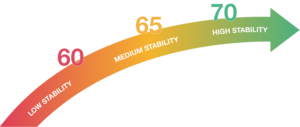
ISQ means Implant Stability Quotient and derives from Herz since the technique we use is Resonance Frequency Analysis (RFA). The scale in Herz is non-intuitive and hard to communicate so it was translated to a scale of ISQ 1-99, more than 20 years ago. Today we know that the scale correlates to micro mobility and that high stability means > 70 ISQ, between 60-69 is medium stability and < 60 ISQ is considered as low stability.

What is an ISQ value?

ISQ (Implant Stability Quotient) is a numerical value from 1 to 99 that describes implant stability. It is calculated from the resonance frequency measured when the Osstell instrument sends a magnetic pulse to a SmartPeg attached to the implant, translating this into a clinically intuitive value.
 

What ISQ value should I have before loading?

There is no single ISQ value that determines when an implant can be loaded. The decision depends on the stability over time (the ISQ trend), as well as clinical judgement and patient-specific risk factors.
As a general guideline, higher ISQ values provide greater confidence, and values around 70 or above are often considered suitable for loading non-splinted implants. For splinted restorations, lower values may be acceptable.
For guidance on how to interpret ISQ values, see the Osstell ISQ Scale.

Why do I need to take two measurements at the same occasion?

ISQ should always be measured in two directions, because implant stability can vary depending on the amount of surrounding bone in different directions. Measuring from two angles ensures that both the most and the least stable directions are captured.
To do this, take one measurement in the buccal-lingual direction and one in the mesial-distal direction. These two ISQ values represent the different stability directions. Sometimes the values are identical; sometimes they differ.
If the two measurements differ, always rely on the lowest ISQ value, as it reflects the weakest direction and therefore provides the most clinically relevant information about implant stability.

There is no single ISQ value that determines suitability for immediate loading. In addition to the ISQ value, the decision depends on primary stability, clinical judgement, and patient-specific risk factors.
As a general guide, higher ISQ values indicate greater stability, and values around 70 or above may support immediate loading in appropriate cases.
For guidance on interpreting ISQ values, see the Osstell ISQ Scale.

Are there any studies that prove the Osstell method?

There are currently thousands of articles where Osstell was used in the study, published in scientific papers. These abstracts could be found in our searchable database under “Resources/Scientific database“.

The Osstell ISQ scale is based on outcomes from these studies, all performed using Osstell instruments and aluminium SmartPegs.

What does Osstell measure?

Osstell measures the lateral stability of the implant and thereby indirectly the degree of osseointegration. The results are presented as an ISQ, ranging from 1-99 ISQ, which correlates to micro mobility.

How does the Osstell technology work?

Osstell measures implant stability using Resonance Frequency Analysis (RFA). The small SmartPeg that you attach to the implant has a tiny magnet on top. When the probe sends magnetic pulses, the SmartPeg starts to vibrate – similar to a very small tuning fork.
How it works:

  1. The instrument tip sends magnetic pulses
    These pulses make the SmartPeg vibrate without touching it.
  2. The vibration changes depending on how stable the implant is
    – A stable implant (good bone support) makes the SmartPeg vibrate faster.
    – A less stable implant makes it vibrate slower.
  3. The device converts this vibration into an ISQ value
    – Higher stability → higher frequency → higher ISQ
    – Lower stability → lower frequency → lower ISQ

It takes less than a second, and the ISQ value is shown immediately.

What is the difference between RFA and DCA (Periotest) measurements?

Periotest (DCA) measurements are designed for natural teeth, which are connected to the bone via the periodontal ligament. In contrast, dental implants are anchored directly to the bone without a periodontal ligament.
RFA measurements using Osstell instruments assess implant stability by measuring the stiffness of the bone–implant interface. They provide an objective and repeatable value on a more sensitive scale, supporting reliable assessment over time.

What is the difference between ISQ and torque?

Torque is a one-time, static measurement taken at implant placement and cannot be repeated later without risking the implant’s osseointegration. It reflects the rotational friction between the implant surface and the bone, rather than the lateral stability of the implant.
Measuring implant stability with Osstell instruments assesses the lateral stability of the implant. These measurements are contact-free and can be repeated over time to monitor the development of osseointegration.

What is the difference between ISQ and BIC?

ISQ and BIC measure different aspects of implant integration.
BIC (bone-to-implant contact) describes the percentage of the implant surface in contact with bone at a microscopic level, while ISQ reflects implant stability by measuring the stiffness of the bone–implant interface.

As a result, high BIC does not always mean high stability, as bone quality and stiffness also play a key role.

For a more detailed explanation, see: How ISQ correlates to torque

Does the way the SmartPeg is tightened affect the ISQ value?

Yes. The ISQ value can be affected if the SmartPeg is not mounted correctly.

For accurate measurements, the SmartPeg should be attached finger tight using the SmartPeg Mount, which corresponds to about 4–6 Ncm.

At this level, the SmartPeg has firm, stable contact with the implant, and the resulting ISQ value is consistent – typically within ±2 ISQ units.

  • If the SmartPeg is not fully seated:
    The contact becomes unstable, and the ISQ value can appear artificially low, or you don’t receive any value.
  • If too much force is applied:
    Overtightening does not improve accuracy. It may damage the SmartPeg threads.
    – A reusable SmartPeg may be damaged so it cannot be used again.
    – A single use or reusable SmartPeg may have its threads deformed, which can lead to inaccurate measurements during that session or, in worst case a broken SmartPeg.

In short: finger tight (4–5 Ncm) is enough to ensure stable contact and reliable ISQ readings.

What should I do if no ISQ value is displayed?

If no ISQ value appears, it usually means the SmartPeg’s vibration is not being detected clearly by the instrument. Several factors can cause this, and most are easy to resolve:

  1. Distance to instrument is too great
    The instrument should normally be held 2–4 mm from the magnet on top of the SmartPeg. Do not touch the magnet. If no value appears, move the instrument closer until the signal is detected.
  2. Angle needs adjustment
    The magnetic field is directional, so the orientation of the instrument matters. Measurements should be taken at approximately a 45° angle relative to the top of the SmartPeg.
  3. Ensure you have the correct SmartPeg Type for the specific implant
    Use this link to find the correct SmartPeg Type: Find my SmartPeg
  4. Soft tissue damping
    Surrounding tissue can sometimes dampen the vibration more than expected. Holding the instrument a bit closer usually compensates for this.
  5. The implant platform is not clean
    Ensure the implant platform is clean and free of debris, so the SmartPeg seats properly and transmits its vibration.
  6. The SmartPeg is worn or damaged
    • If you are using a reusable SmartPeg, make sure it has been inspected before use and that it is within 20 reprocessing cycles. A reusable SmartPeg that is worn out, bent, or has damaged threads will not vibrate correctly — and the instrument may not be able to pick up a reading.
    • A single‑use SmartPeg is intended for one treatment session only.
    • Ensure the SmartPeg is properly seated on the implant and that it is not in contact with surrounding tissue, as this can prevent accurate signal detection and may result in no ISQ value or an incorrect one.
  7. Electromagnetic interference
    Strong electromagnetic noise sources nearby may disturb the measurement. (See the FAQ on “Electromagnetic noise” for details.)

What is the lowest ISQ value typically observed?

Clinically, the lowest ISQ values typically seen are around 40.

If the stability is below 30, the implant is generally considered to have very low stability or to be loose. It may also indicate that the SmartPeg is not correctly mounted on the implant.

Very low values (below 20) are rarely seen in clinical situations and are more commonly observed in laboratory models with artificially low stability.

When should I measure implant stability?

Implant stability can be measured at different stages of treatment.
It is typically measured at implant placement to establish a baseline, and then during healing to monitor changes in stability and osseointegration. A final measurement is often taken before loading to support the decision.
Repeated measurements over time provide valuable information, as the trend in ISQ values helps guide clinical decisions.